Rigidbody
Rigidbodies enable your GameObjects to act under the control of physics. The rigidbody can receive forces and torque to make your objects move in a realistic way.
Any GameObject must contain a Rigidbody to be influenced by gravity, act under added forces via scripting or interact with other objects through the NVIDIA PhysX physics engine.
Rigidbodies allow the GameObjects to act under control of the physics engine.
When an object is under physics control, it moves semi independently of the way its transform parents move. If you move a parent, it will pull the rigidbody child along with them.
To control rigidbodies in the code you will need to use AddForce(forceVector) and AddTorque() on the rigidbody. When two colliders make contact, the OnTriggerEnter() method of both is called.
The collider blocks physics objects but the Trigger lets them through.
For some animations, such as creating ragdoll effects, it is necessary to switch control of the object between animations and physics, for this the rigidbodies can be market isKinematic. While it is enable, it will not be affected by collisions, forces or any physics.
A collider must be added alongside the rigidbody in order to allow collisions to occur.
Compound colliders are combinations of primitive colliders, collectively acting as a single collider. They come handy when you have a model that would be too complex or costly to simulate exactly and want to simulate the collisions of the shape in an optimal way. To create the compound collider, create child objects of the colliding object, then add a collider to each one. When the rigidbody parent is moved around, the child colliders move along with it.
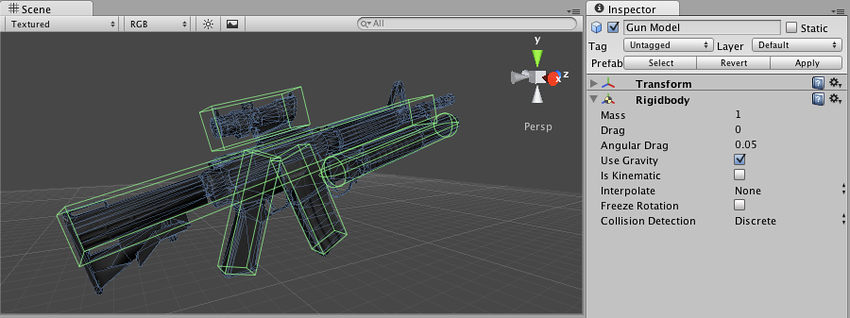
Continuous collision detection is a feature to prevent fast-moving colliders from passing each other. This may happen when using discrete collision detection, when an object is one side of a collider in one frame and already passed the collider in the next frame. To solve this, you can enable continuous collision detection on the rigidbody of the fast-moving object.
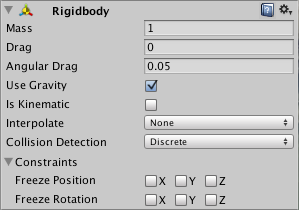
Mass, the mass of the object, in kg by default
Drag, How much air resistance affects the object when moving from forces. 0 means no air resistance, infinity makes the object stop moving immediately
Angular Drag, How much air resistance affect the object when rotation from torque
Use Gravity, If enabled, the object is affected by gravity
Is Kinematic, If enabled the object will not be driven by the physics engine and can only be manipulated by its Transform
Interpolate
None, no interpolation applied
Interpolate, Transform is smoothed based on the Transform of the previous frame
Extrapolate, Transform is moothed based on the estimated Transform of the next frame
Collision Detection, use to prevent fast moving object from passing through other objects without detecting collisions
Discrete, used against all other colliders, for normal collisions, it is the default
Continuous, used against dynamic colliders and static Mesh Colliders. This has a high impact on physics performance
Continuous Dynamic, used against objects set to continuous and continuous Dynamic Collision, it will aso use continuous collision detection against static Mesh Colliders. Used for fast moving objects
Constraints, restrictions on the Rigidbody motion
Freeze Position, stops the rigidbody moving in X, Y and Z selectively
Freeze Rotation, Stops the rigidbody rotation around X, Y and Z selectively